Step 5: Fake planning
In step 5 you plan pure fake targets — villages that receive fakes only and are not hit for real. Accompanying fakes for real targets belong to their target instead and are defined in step 4.
There are two groups:
- 5.1 Normal-Fakes
- 5.2 Bunker-Fakes
Both groups are built the same way
Normal-Fakes and Bunker-Fakes differ in nothing but their name and their colour on the map. The split is only a suggestion — you can just as well use the two groups for two arbitrary parallel fake operations, for example to be able to tell them apart in the results later.
1. Step 5.1: Normal-Fakes
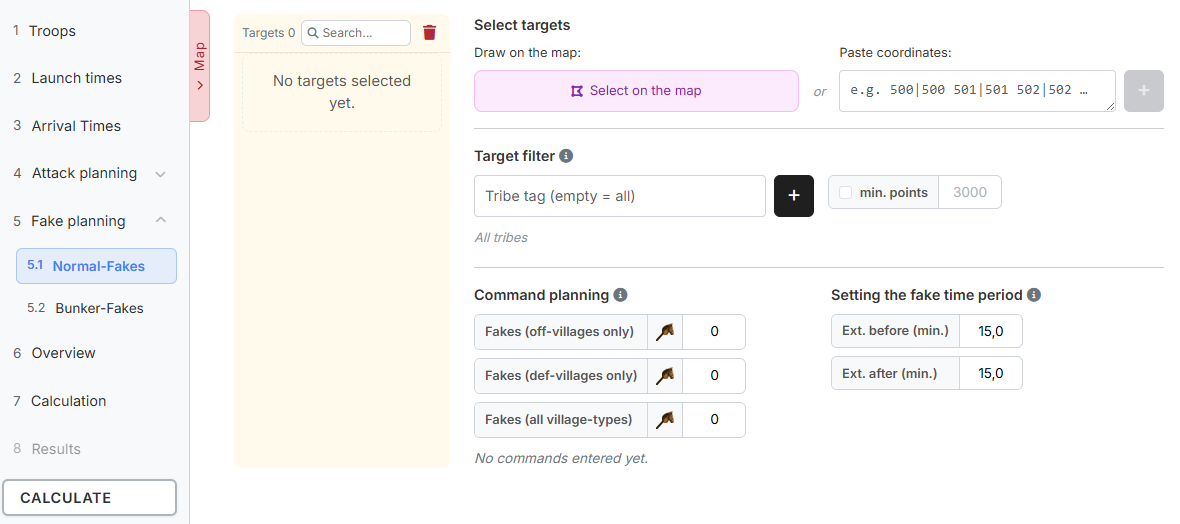
On the left sits the target list of the group with a count, a search field and a bin ("Delete all"), on the right the settings.
1.1 Selecting targets

Two ways are available:
- "Draw on the map:" — "Select on the map" opens the overall map in selection mode, see The Overall Map. For fake planning this is the most convenient way, because it lets you mark whole regions in one go.
- "Paste coordinates:" — for individual targets.
There is no import from a saved plan here.
Real targets take precedence
Villages that already sit in a category of the attack planning are filtered out when adding — the tool reports them as "Targets ignored (already planned elsewhere)". Conversely, a fake target automatically moves into the attack planning if you enter it there.
1.2 Target filter
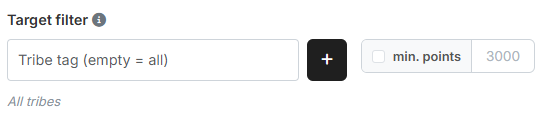
The target filter narrows down which villages qualify as a fake target at all:
- "Tribe tag (empty = all)" — type a tag and add it with the plus button. Several tribes are possible; they appear as chips below. If the field stays empty, "All tribes" applies.
- "min. points" — checkbox plus number (default
3000). Only villages from this point count upwards qualify.
The target filter applies everywhere
The filter determines which villages qualify as a fake target at all. It applies to both fake groups and to the selection on the map: there only what matches it gets marked. So you can drag generously across the map with the filter set, without accidentally catching tiny villages or the wrong tribe.
If you change the filter while the map is open, that takes effect on the marking immediately.
1.3 Command planning
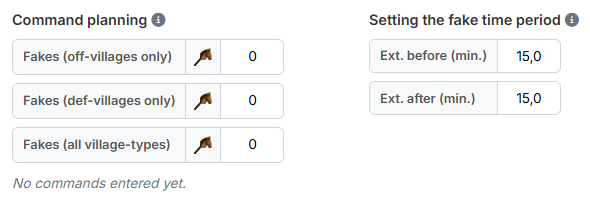
How many fakes every target of this group receives, broken down by the kind of origin village:
- "Fakes (off-villages only)" — from off-villages only.
- "Fakes (def-villages only)" — from def-villages only.
- "Fakes (all village-types)" — from any village.
Below that the sum runs along: "Fakes per target: 3", or "No commands
entered yet." as long as all fields are at 0.
1.4 Setting the fake time period
To the right of it are "Ext. before (min.)" and "Ext. after (min.)",
both 15.0 by default. They define how far apart the fakes of a target may
lie in time.
The first fake spans the time period
For the first fake of a target the arrival time frame for fakes from step 3 applies, extended by the two values. As soon as that fake is set, its arrival time becomes the anchor: every further fake on the same target must arrive between "Ext. before" ahead of and "Ext. after" behind that anchor. Large values therefore scatter the fakes of a target further apart, small ones pull them together.
Unlike in the attack planning, where the fake time period is derived from the real commands of the target, there are no real commands here — hence the detour via step 3 and the first fake.
2. Step 5.2: Bunker-Fakes
The group Bunker-Fakes is built identically. It has its own target list, its own command planning and its own fake time period — only the target filter from section 1.2 is shared by both groups.
On the overall map the targets of both groups appear in different shades of violet and can be shown and hidden individually via the chips "Normal-Fakes" and "Bunker-Fakes".
In the results, the commands of both groups are counted together as "Fakes (Fake planning)" and are thus distinguished from the accompanying fakes of the attack planning.
Next up: Step 6: Overview.