Members

The "Members" tab shows all Discord users who have verified one or more TW-Accounts on the tribe Discord server. At a glance you can see who in the tribe is even linked with the tw-utils Discord bot and which rights they hold. This is also where all roles are granted.
TWU-Leader only
The "Members" tab is visible exclusively to users with the TWU-Leader role. Which role sees which tab is described under Permission.
Table columns
There is exactly one row per Discord user — even if they have verified several TW-Accounts.
| Column | Meaning |
|---|---|
| # | Running number |
| Discord-User | The linked Discord account |
| Linked accounts | All verified TW-Accounts of this user, linked into the game |
| Rights | The granted roles as badges; without a role it says "Member" |
| "Manage" button that opens the rights dialog |
Via the "Search..." field at the top right you filter the list by Discord name or TW-Account.
Manage rights
The "Manage" button in a row opens the "Manage rights" dialog:
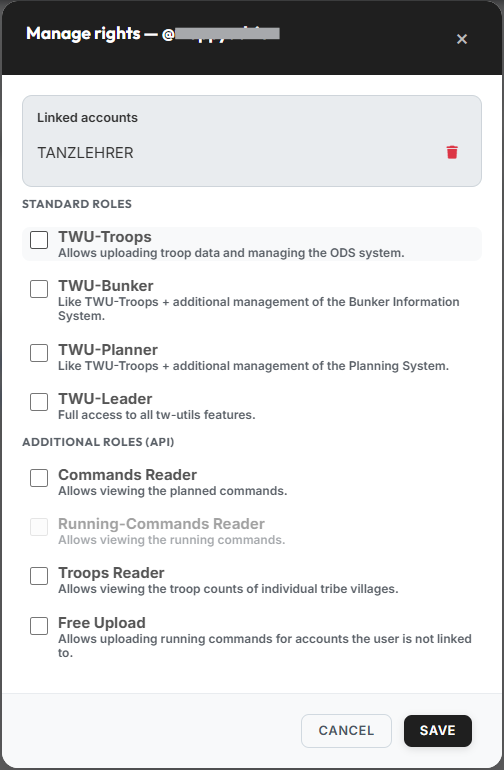
At the very top you find the user's linked accounts. Via the red trash icon you can remove a single link between the Discord user and a TW-Account. The Discord user can re-verify via the bot at any time afterwards.
Below that the roles follow in two blocks.
Standard roles
These four roles control what a user may do on tw-utils.net and in the Discord bot:
| Role | Meaning |
|---|---|
| TWU-Troops | Allows uploading troop data and managing the ODS system. |
| TWU-Bunker | Like TWU-Troops + additional management of the Bunker Information System. |
| TWU-Planner | Like TWU-Troops + additional management of the Planning System. |
| TWU-Leader | Full access to all tw-utils features. |
The roles build on each other, and the dialog applies that directly:
- If you set TWU-Leader, then TWU-Troops, TWU-Bunker and TWU-Planner are ticked automatically and locked — full access includes them anyway.
- If you set TWU-Bunker or TWU-Planner, then TWU-Troops is ticked automatically and locked.
Two locks against locking yourself out
You cannot revoke your own TWU-Leader role, and the last TWU-Leader of a server is always kept. In both cases the checkbox is fixed, or saving is rejected with a notice.
Additional roles (API)
The additional roles concern the tw-utils API only, through which userscripts exchange data. They are not needed for the normal operation of the website.
| Role | Meaning |
|---|---|
| Commands Reader | Allows viewing the planned commands. |
| Running-Commands Reader | Allows viewing the running commands. |
| Troops Reader | Allows viewing the troop counts of individual tribe villages. |
| Free Upload | Allows uploading running commands for accounts the user is not linked to. |
Running-Commands Reader cannot be granted yet
The "Running-Commands Reader" role is shown greyed out in the dialog and cannot be ticked. There is currently no API read access for running commands — the role is reserved for a later extension. Anyone who wants to see the running commands in the Leader-View needs TWU-Planner or TWU-Leader (see Running Commands).
"Save" applies all changes; they take effect immediately.