Step 4: Fake-Sup
In step 4 you plan fake support onto the same targets. It arrives at the opponent from your villages and is meant to make them believe the target is being supported.
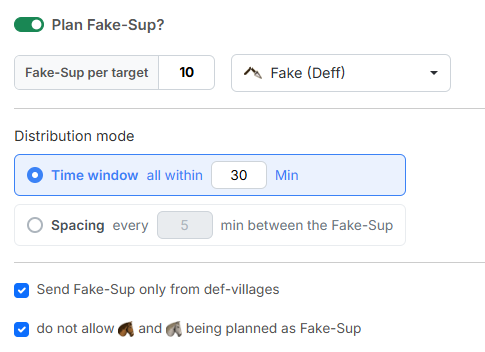
1. Plan Fake-Sup?
The switch "Plan Fake-Sup?" is off by default — without it the tool only plans catapult-cleaners. Only once you switch it on do the settings below become usable.
- "Fake-Sup per target" — how many Fake-Sup every target receives. Default
10. - The dropdown next to it determines the icon of the Fake-Sup commands. The default is "Fake (Deff)".
2. Distribution mode
The "Distribution mode" determines how the Fake-Sup of a target spread out in time. There are two possibilities:
- "Time window — all within X Min" (default
30) — all Fake-Sup of a target are sent within X minutes after the snob command, spread evenly across that window. - "Spacing — every X min between the Fake-Sup" (default
5) — the Fake-Sup form a chain: each starts at least X minutes after the previous one. There is no upper limit; the chain ends as soon as a further Fake-Sup could no longer arrive in time.
When the Fake-Sup are on their way
Fake-Sup always start after the snob command and arrive exactly with it. The mode only decides how closely the launch times sit together: the time window keeps them all in a fixed frame, the spacing pulls them evenly apart — but without an upper limit.
One reference command per target village
If you imported several commands onto the same target village, all Fake-Sup of that target line up with one of them: the one with the latest arrival. The remaining commands onto that village are ignored for Fake-Sup planning.
3. Where the Fake-Sup may come from
Two checkboxes narrow down the choice of origin villages, both are ticked by default:
- "Send Fake-Sup only from def-villages" — restricts the origin to purely defensive villages. That keeps your off-villages free for the actual operation.
- "do not allow light cavalry and scouts being planned as Fake-Sup" — excludes fast units. For the opponent they would be a clear sign that this is not genuine support.
World settings are taken into account
When planning the Fake-Sup the tool takes the world settings around support into account. If the world only allows support within your own tribe, the tool plans the Fake-Sup exclusively from villages of the attacking tribe.
Next up: Step 5: Results.