Running Commands

The "Running Commands" tab shows what is actually on its way in the game right now — not what was planned. Attacks, supports and returning troops of all players who have uploaded their command overview come together here.
As tribe leadership this shows you at a glance which nukes are already flying, where support is on its way and which troops are currently tied up.
The data comes in exclusively through the tw-utils API
tw-utils reads nothing from the game. Running commands only end up here if a player uploads them through the tw-utils API — usually with a userscript that reads the command overview in the game.
tw-utils provides only the infrastructure for that: the endpoint and the personal API key. A ready-made userscript is explicitly not part of the package — your tribe has to bring its own. How the interface works is described in the API documentation.
TWU-Planner and TWU-Leader only
The "Running Commands" tab is visible exclusively to users with the TWU-Planner or TWU-Leader role. Details under Permission.
The tab has two sub-tabs: Overview (one row per player) and Commands (every single command).
What the data is used for
The uploaded commands are not just there to look at — they feed into the planning in several places:
- Leader-View — this tab with the Overview and Commands sub-tabs.
- Nuke-planning tool — in step 1 the switch "Include running commands (API)" subtracts the troops that are already on their way. That is more precise than calculating from saved plans, because it also covers commands that never came from a plan at all. See Step 1: Troops.
- Cleaner & Fake-Sup — the same switch in step 1, see Step 1: Troops.
In both planning tools the switch only appears if you hold the right to read running commands on a Discord server for this world.
How the data gets here
Every player uploads their own commands — in two steps:
- On "My Accounts" the player creates their personal API key in the account card.
- A userscript reads the command overview in the game and sends it to tw-utils using that key.
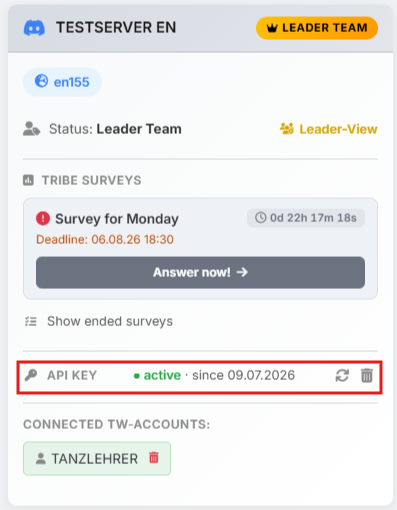
The two icons on the right let you regenerate or delete the key at any time. It is to be treated like a password and always applies to one Discord server only.
How an upload behaves, which limits apply and who may upload for which accounts is described in the API documentation.
No refresh button
The page deliberately has no refresh button: the data only ever changes when a player uploads again. Reloading the page is enough to see the current state.
The "Overview" sub-tab
The overview shows one row per player who has ever uploaded: who it was, who triggered the upload, when that last happened, and how many commands came in — as a total and broken down into attacks, supports and returning attacks and supports.
All columns except # can be sorted by clicking the header. Without your own sorting, the most recent upload is on top.
The red \"outdated\" badge
If a player's last upload is more than one hour old, a red "outdated" badge appears behind the timestamp. The numbers in that row may then no longer reflect reality — in the meantime commands may have arrived or new ones may have started. For planning purposes you should ask that player to upload again.
The "Commands" sub-tab
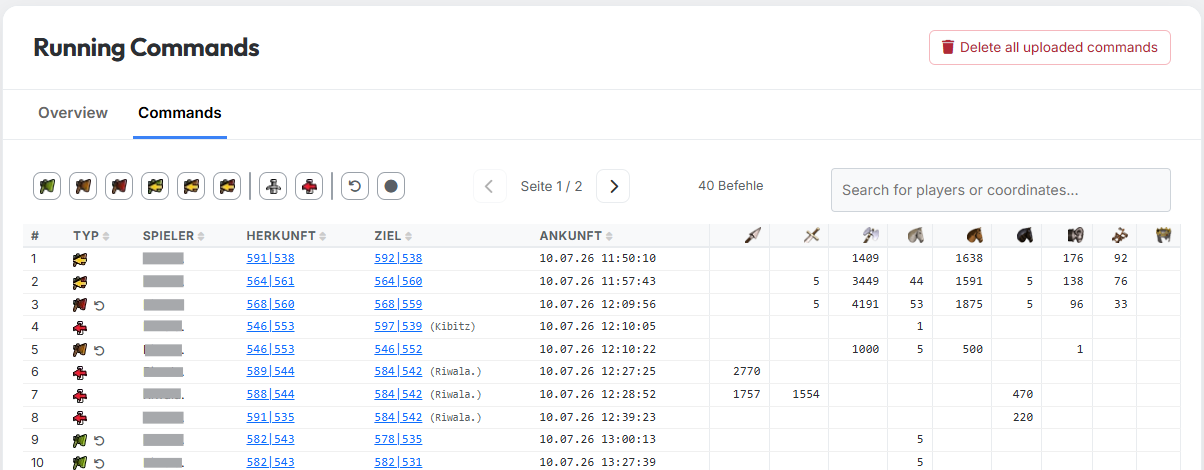
This is where every single uploaded command of the tribe is listed.
| Column | Meaning |
|---|---|
| # | Running number, continues across pages |
| Type | Symbol of the command (kind and size), plus a state symbol if applicable |
| Player | Owner of the command — always the player who uploaded it |
| Source | Source village, linked into the game |
| Target | Target village with the owner in brackets |
| Arrival time | Arrival time in world time |
| Units | One column per unit of the world; empty cells mean 0 |
By default the table is sorted by arrival ascending — so the next impact is on top. The columns Type, Player, Source, Target and Arrival time can be re-sorted by clicking.
Filters, search and pages
Above the table sits a bar of icon filters. From left to right:
| Icon | Filters for |
|---|---|
| Small attack flag | Small attack — up to 1,000 troops |
| Medium attack flag | Medium attack — up to 5,000 troops |
| Large attack flag | Large attack — more than 5,000 troops |
| Small returning flag | Small attack (returning) |
| Medium returning flag | Medium attack (returning) |
| Large returning flag | Large attack (returning) |
| Shield | Support |
| Shield with arrow | Support (returning) |
| ↺ | Uncertain combat outcome |
| ● | Support already arrived |
The filters can be combined — everything matching at least one of the active filters is shown. With no filter active you see everything.
The last two filters do not describe a command type but a state:
- Uncertain combat outcome — an attack whose arrival time has already passed. tw-utils does not know whether it got through; the troops are presumably on their way home. In that case the type symbol additionally shows the estimated time of return.
- Support already arrived — a support whose arrival time has passed. The troops are therefore presumably stationed in the target village.
To the right of it sit the page arrows (25 commands per page), the number of currently filtered commands and a search field. The search covers player names and coordinates of both source and target at once.
Old commands and clean-up
Commands disappear by themselves — not by the clock, though, but on the next upload: whenever any player of this Discord server uploads again, tw-utils takes the opportunity to clear out everything whose troop movement ended more than an hour ago. For attacks it is not the arrival that counts but the return flight — after all, the troops are tied up until they get home. For all other command types the arrival counts.
So if nobody uploads any more, old rows stay put. In normal operation manual clean-up is still not needed.
\"Delete all uploaded commands\" hits the whole server
The button at the top right deletes the running commands of all players of the Discord server, not just those of a single one. The action cannot be undone — the data only comes back once every player uploads again. Anyone who may see the tab can also press this button.