Step 3: Cleaner
In step 3 you define what the catapult-cleaners should look like and how many of them are planned.
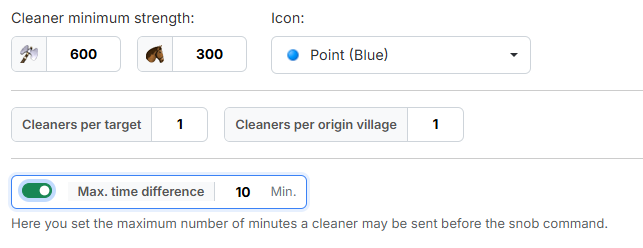
1. Cleaner minimum strength
Under "Cleaner minimum strength:" you enter the required strength of the
cleaner — as a number of axemen (default 600) and a number of light
cavalry (default 300).
How the minimum strength is evaluated
From your entries the tool calculates the attack strength of the cleaner. Afterwards any combination of axemen and light cavalry that reaches that attack strength is accepted — only those two units count towards the strength. So pure light cavalry cleaners can be planned as well, provided the village holds enough light cavalry.
To the right you choose the workbench icon the cleaner commands receive via "Icon:". The default is "Point (Blue)".
2. Number of cleaners
- "Cleaners per target" — how many cleaners are planned per imported
command. Default
1, minimum1. - "Cleaners per origin village" — how many cleaners may start from the same
origin village at most. Default
1, minimum1.
The value applies per command, not per target village
If you imported a four-snob train onto one village in step 2 and set
1 here, four cleaners are created for it — one per snob command, each
from a different origin village.
The second value is the brake against individual overloaded villages: without it the tool would keep planning from the best-placed villages over and over.
3. Max. time difference
The switch "Max. time difference" is off by default. If you switch it on,
the field next to it becomes usable (default 10 minutes).
It defines how many minutes a cleaner may be sent before the snob command at most. Without this limit the tool also takes origin villages further away, whose cleaners would have to start correspondingly earlier.
What the limit is good for
The longer the lead time, the bigger the risk: the cleaner is already on its way while something at the train can still change. A tight limit keeps the launch times close together — but it costs origin villages, because villages further away drop out. If the tool finds too few cleaners, this value is one of the first levers.
Next up: Step 4: Fake-Sup.