Step 3: Arrival Times
In step 3 you define when the commands should land. The step carries two separate time frames: one for the attack planning (step 4) and one for the standalone fake planning (step 5).
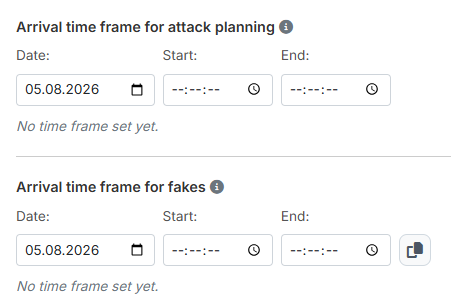
1. Arrival time frame for the attack planning
Enter "Date:", "Start:" and "End:". As soon as all three fields are filled, the line below sums up the time frame — for example "Arrival between 24.12.2026 20:00:00 and 23:00:00". As long as something is missing, it reads "No time frame set yet."
When you fill in "Start:", the tool automatically writes one hour later into "End:" — even if something was already there. So always fill in "End:" after "Start:". This applies to both time frames of this step.
Across midnight
If "End:" lies before "Start:", the tool reads that as a time frame running across midnight and calculates with the following day. Exactly equal times, on the other hand, do not count as a rollover but as an empty time frame — the check before the calculation rejects that.
The time frame applies to the 1st nuke
The corridor defines the timeframe in which the 1st planned nuke must arrive. Further nukes and fakes can arrive slightly outside the defined corridor, depending on the settings for the fake time period and the min/max distance.
Also plan enough distance to the night bonus — when it applies differs from world to world.
You find the follow-up settings mentioned here per target category in step 4: the distances between the nukes and the fake time period.
2. Arrival time frame for fakes
The second time frame applies exclusively to the pure fake targets from step 5 — that is, to targets that receive no real commands. Accompanying fakes of real targets follow the real commands of their target instead and not this time frame.
The operation is identical. In addition there is a copy button to the right of the fields with the tooltip "Copy from attacks": one click takes over date and times from the upper time frame, so you do not have to enter them a second time.
The time frame applies to the 1st fake
The corridor defines the timeframe in which the 1st planned fake must arrive. Further fakes can arrive slightly outside the defined corridor, depending on the settings for the fake time period.
Here, too, plan enough distance to the night bonus.
Both time frames are mandatory — but only when they are needed
Before the calculation the tool checks whether the required time frames are complete. If you plan no standalone fakes, the second time frame has no consequences. If a required time frame is missing, the check panel in step 7 lists it instead of starting the calculation.
Next up: Step 4: Attack planning.