The Two Ways
The snob planning tool distributes noblemen onto target villages and works out the launch and arrival times for them. There are two ways to do that, and you decide right at the top: the "Planning mode" bar sits above the step bar and applies to the whole tool.
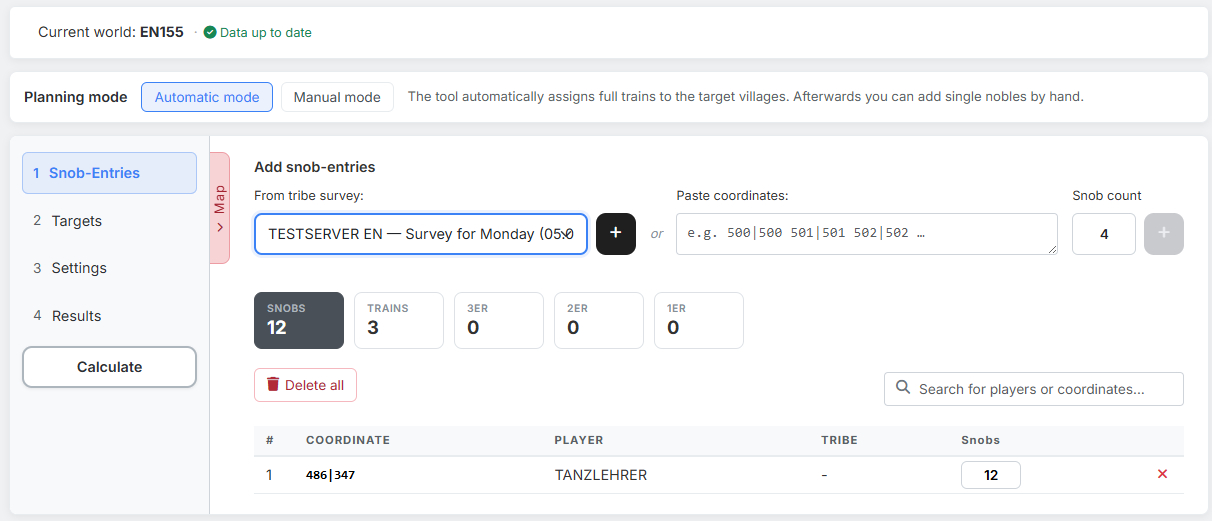
At the very top you find the currently selected world with its status line ("Data up to date.", "Update available." or "Data incomplete. Please load."). It comes from the world selection in the main menu — without loaded world data the tool can neither check coordinates nor draw the map.
1. Automatic mode
"Automatic mode" is preselected. You work through the steps in order and let the tool calculate at the end:
- Step 1: Snob-Entries — where the noblemen come from.
- Step 2: Targets — what they should fly at.
- Step 3: Settings — when they should arrive.
- "Calculate" in the step bar.
- Step 4: Results — check the trains, top them up, save.
The tool assembles full trains and distributes them onto the targets. The order follows the runtime priority you assign per target: first all targets set to Short (each from the nearest origin village), then those set to Long (from the furthest away), and finally N.A.
Whatever is left over you add by hand in the results via "Further Snob-Options".
2. Manual mode
In manual mode the tool calculates nothing — you place every command yourself, with two clicks on the map. This is the way for situations where you know exactly which village should noble which target.
The interface changes visibly:
| Automatic | Manual | |
|---|---|---|
| Step 2 "Targets" | open | locked — targets are created while planning on the map |
| "Excluded Launch times" | present | hidden |
| "Calculate" button | present | hidden |
| Step 4 "Results" | after the calculation | as soon as entries and an arrival time exist |
| "Planned" / "Manual mode" tabs | present | hidden |
The workflow is correspondingly short: enter the snob-entries in step 1, set the arrival time in step 3 — and then plan on the overall map.
You can switch mode at any time
Whatever you have already entered survives the switch. Going into manual mode merely hides the controls that play no role there.
3. What is the same in both ways
- The step bar on the left: you jump between the steps freely, the tool does not enforce a fixed order.
- The overall map, reachable via the "Map" tab on the left edge of the content area.
- The results with the three buttons "Save Plan", "Workbench" and "Excel".
Next up: Step 1: Snob-Entries.