Published Containers
A container is a collection of published plans on DS-Ultimate. When publishing, tw-utils splits a saved plan up by player and creates a separate DSU plan for each of them — so everybody only gets to see their own commands.
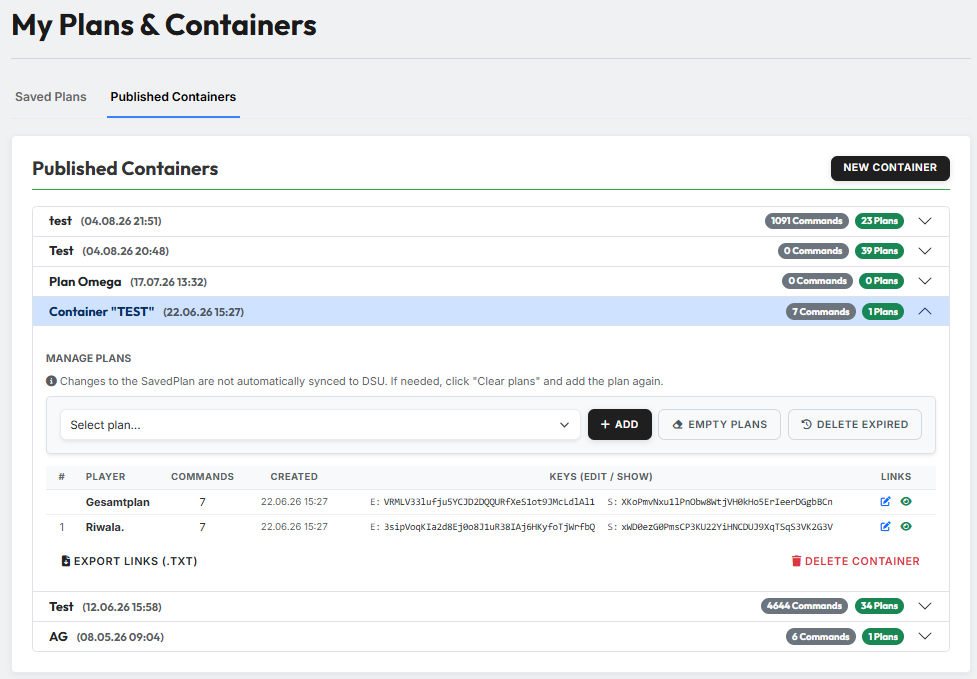
The tab lists all containers of the current world. Per row you find the name, the creation date and two badges: how many commands and how many plans the container contains. A click on the arrow unfolds it.
There is more for the whole tribe
This page manages your containers. In the Leader-View, tribe leadership has a considerably more extensive view under Planning (Container) with command editing, plan distribution and status tracking.
1. Creating a container
"New Container" opens a small dialog in which you enter a name for the container. The container is empty afterwards — filling it is the next step.
2. Publishing a plan
Inside the unfolded container, under "Manage plans", sits the dropdown "Select plan…" with your saved plans. Select one, click "Add" — that is the publishing step. tw-utils then creates the DSU plans; with large plans this takes a moment.
You can put several plans into the same container one after another. Commands of the same player end up in the same DSU plan.
Changes do not carry over automatically
If you edit a saved plan afterwards, the already published DSU plan does not change. The page says so itself. The way back: "Empty plans" and add the plan again.
3. The container's plan list
The table shows the player per row, the number of their commands, the creation date, the two keys (edit and show) and the links to the DSU plan on the right.
At the very top, without a sequential number, sits the Gesamtplan: an additional DSU plan containing all commands of all players. It is meant for tribe leadership, who want to see the whole attack at a glance.
Below the table sits "Export links (.txt)" — it downloads all DSU links as a text file, so you can hand them out on Discord, for example.
4. Cleaning up
Next to "Add" there are two buttons:
- "Empty plans" — deletes all commands from the container's DSU plans. The plans themselves and their links remain; whoever already has the link keeps it.
- "Delete expired" — removes only the commands whose arrival lies in the past. Active commands are kept.
At the bottom right, "Delete container" deletes the container in tw-utils. The plans on DS-Ultimate remain — only the link to them here disappears.
All four actions ask for confirmation first.