Notifications
The tw-utils bot can remind you of important events via Discord DM — for example shortly before your commands are launched, before a sitting slot you've taken over starts, or when a bunker request has been processed. You can control precisely which of these reminders you receive and from which Discord servers they are sent at all.
There are two ways to manage these settings:
- With an account on tw-utils.net — granular per reminder type and per server, including lead time and cooldown.
- Without a website account — a simple
Notifications: ON / OFFtoggle per server directly via the Discord bot.
1. Prerequisite
Notifications are delivered exclusively as Discord direct messages. Anyone who has not linked a Discord account to their tw-utils profile will see this notice on the Notifications page:
You don't have a Discord account linked. Notification settings are only available for Discord-linked accounts.
As soon as the link is in place, all settings from the following sections are available.
2. Settings via website account
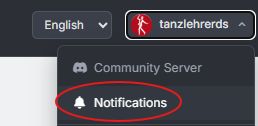
Click your user name in the top right and choose Notifications from the dropdown.
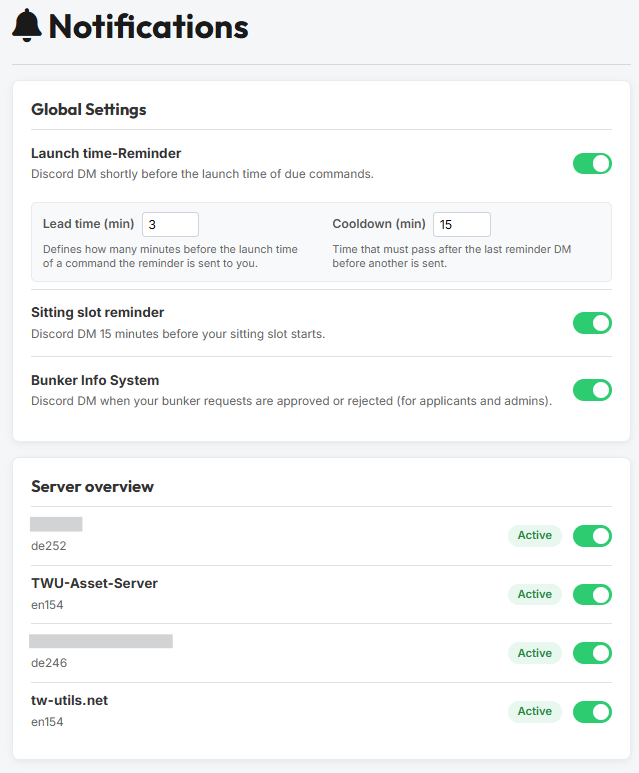
You land on the Notifications page with two cards: Global Settings and Server overview.
2.1 Global Settings
The Global Settings card controls per reminder type whether you want to receive this kind of DM at all. There are four types.
Launch time-Reminder
Discord DM shortly before the launch time of due commands.
As soon as you activate the toggle, two additional fields appear that let you fine-tune the reminder.
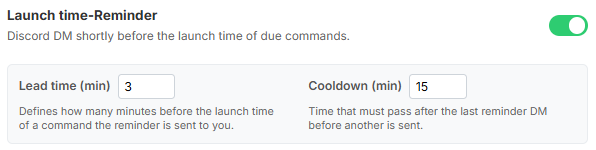
Lead time (min)— Defines how many minutes before the launch time of a command the reminder is sent to you. Range: 1–15 minutes. Default: 5 minutes.Cooldown (min)— Time that must pass after the last reminder DM before another is sent. Range: 1–60 minutes. Default: 15 minutes.
Example
Lead time 5, Cooldown 15. A command is due at 14:00 → the DM is sent at 13:55. If another command becomes due between 13:55 and 14:10, the bot does not send a second DM — it waits until the cooldown window has passed. Multiple commands due at the same time on the same world are bundled into a single DM anyway.
Sitting slot reminder
Discord DM 15 minutes before your sitting slot starts.

This reminder belongs to the Account-Sitting-System and fires 15 minutes before a sitting slot you've taken over begins. The lead time is fixed and not configurable.
Bunker Info System
Discord DM when your bunker requests are approved or rejected (for applicants and admins).

This reminder belongs to the Bunker-Information-System. You receive a DM as soon as an admin approves or rejects your bunker or top-up request. Admins can also enable the DM for the requests they have processed themselves.
Tribe Surveys
Discord DM when a leader starts a new tribe survey.
This reminder belongs to the Tribe Surveys in the Leader-View. You receive exactly one DM as soon as your tribe leadership creates a new survey — with title, deadline and a link to the reporting page. The same switch also covers the personal reminder DM a leader can send to an account that has not reported anything yet.
2.2 Server overview
The Server overview card lists every Discord server in which you are a member of a tw-utils-relevant guild. For each server you can suppress DMs from that server entirely — independently of which of the four reminder types are active above.
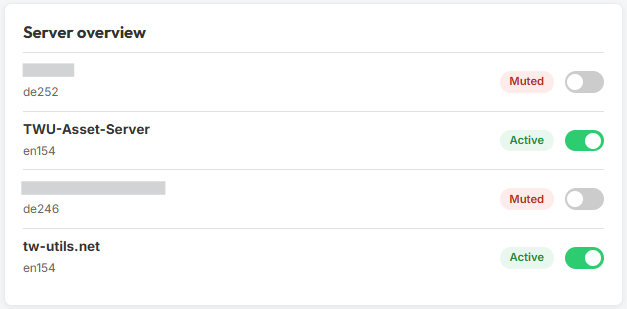
Active(green pill, toggle on) — DMs from this server are delivered.Muted(red pill, toggle off) — DMs from this server are suppressed entirely.
Underneath the server name, the world your TW account is linked to in that guild is shown as well (e.g. de252).
If the list is empty, the card shows the notice:
No servers to display. As soon as you are linked in a guild or toggle a server switch, this list will appear here.
3. Settings via the Discord bot
If you don't have an account on tw-utils.net, you can still roughly control whether you want DMs from the bot on a per-server basis — via a button in the bot setup channel.
3.1 Notifications button in the bot-config channel
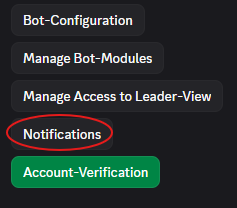
In the bot-config channel (or whichever channel holds the bot setup buttons), there is a button bar. You'll find the Notifications button there.
3.2 Notifications: ON / OFF
Clicking Notifications posts an embed with two coloured buttons.
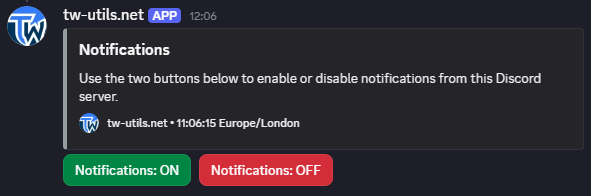
Notifications: ON(green) — enables DMs for this Discord server. On the very first click, the four reminder types (Launch time-Reminder,Sitting slot reminder,Bunker Info System,Tribe Surveys) are additionally activated with their default values, so that something is actually sent. If you had already configured the types individually on the website, your values are preserved.Notifications: OFF(red) — mutes this server. The global reminder type settings remain untouched, you simply stop receiving DMs from this server.
Want more control? Create an account on tw-utils.net
Anyone who wants to disable individual reminder types or adjust the lead time / cooldown of the Launch time-Reminder is best served by creating an account on tw-utils.net and linking their Discord. The Discord button remains fully functional and controls the same server setting.
4. How the toggles interact
A DM is sent only if both toggles are ON
Before every DM, the bot checks two conditions — both must be satisfied:
- The corresponding reminder type is active in the
Global Settings(Launch time-Reminder/Sitting slot reminder/Bunker Info System/Tribe Surveys). - The Discord server the event originates from is set to
Activein theServer overview(equivalent toNotifications: ONin the bot channel).
The server control is the same setting on both paths: whatever you toggle in the Discord bot with Notifications: ON/OFF is reflected afterwards in the Server overview on the website — and vice versa.