Permission

The Leader-View is the tribe-leader area on tw-utils.net. It bundles all the tools you need as a leader to steer your tribe — from member management and troop data to bunker administration, attack planning and the tribe's running commands.
The Leader-View is split into five tabs:
- Members
- Troops
- Bunker-Info
- Planning (tribe surveys and containers)
- Running Commands
Which of these tabs you see depends on your role — see Which role sees which tab?.
Access requirements
For a user to see and use the Leader-View, both of the following conditions must be met:
1. Linking the Discord account to a Tribalwars account
The user must be linked on the tribe Discord server with at least one of their Tribalwars accounts. The linking is done via the tw-utils Discord bot:
- On the tribe Discord server, switch to the channel
#⚫-bot-config. - Click the
Account-Verificationbutton and follow the instructions shown there — the bot guides you through linking the Discord account and the Tribalwars account.
The full step-by-step instructions with all details can be found under Account Verification.
2. At least one tw-utils role
The user must hold at least one of the four tw-utils roles: TWU-Troops, TWU-Bunker, TWU-Planner or TWU-Leader. A member without a role cannot open the Leader-View.
There are two ways to grant these roles.
The normal case: granting them in the Leader-View
As soon as the server has one TWU-Leader, all further rights are granted directly on tw-utils.net: in the "Members" tab via the "Manage" button in the respective row. There you can set and revoke the four standard roles as well as the additional API roles.
The details — including a description of every single role — can be found under Members.
The first leader: granting via the Discord bot
On a freshly set-up server there is no TWU-Leader yet who could hand out roles. The first leader is therefore appointed via the tw-utils Discord bot. Only a Discord administrator of the tribe server can do this:
- On the tribe Discord server, switch to the channel
#⚫-bot-config. - Click the "Manage Access to Leader-View" button.
- In the ephemeral embed that appears, click "Grant Access".
- Select the role — via the bot, only "Leader" (= TWU-Leader) is available.
- Select the Discord user who should receive Leader access.
Via "Terminate Access" you can revoke a user's access; this removes all of their tw-utils roles. With "List authorized Users" all currently authorized users of the tribe Discord server are listed.
Bot setup as prerequisite
For the channel #⚫-bot-config and its buttons to even exist,
the tw-utils Discord bot must first be set up on the tribe Discord
server. A step-by-step guide for this can be found under
Quick-Setup-Guide.
Which role sees which tab?
The four standard roles build on each other: TWU-Bunker and TWU-Planner each contain everything TWU-Troops may do, and TWU-Leader contains all of them together.
| Tab | TWU-Troops | TWU-Bunker | TWU-Planner | TWU-Leader |
|---|---|---|---|---|
| Members | – | – | – | ✓ |
| Troops | ✓ | ✓ | ✓ | ✓ |
| Bunker-Info | – | ✓ | – | ✓ |
| Planning | – | – | ✓ | ✓ |
| Running Commands | – | – | ✓ | ✓ |
Tabs you cannot see do not appear in the tab bar at all — someone who only holds TWU-Bunker sees exclusively Troops and Bunker-Info.
The roles do not live on Discord
The tw-utils roles are not Discord roles. The bot keeps them in its own database and they apply on tw-utils.net and in the Discord bot alike. Nothing has to be created on the Discord server itself. More on this in the Permission Concept.
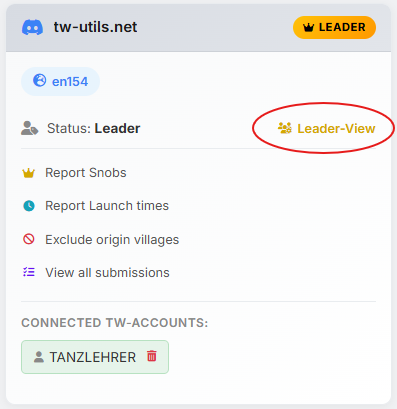
Once both requirements are met, the entry "Leader-View" as well as the yellow "Leader Team" badge appear in the account card of the respective world: