Step 3: Settings
Step 3 is short: here you define when the noblemen should arrive — and which launch times are out of the question for that.
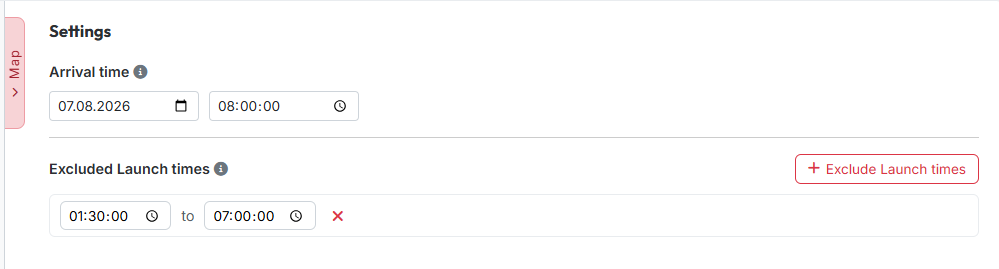
1. Arrival time
Under "Arrival time" you enter the date and time at which the snobs should
arrive at the target. The time is to the second; the default is 08:00:00.
The tool calculates every launch time in the results backwards from that point.
The time applies in the world's time zone, not in your own.
Nothing works without an arrival time
The arrival time is mandatory — in manual mode as well. As long as it is missing, the map refuses to plan and says so.
2. Excluded launch times
With "Exclude Launch times" you create periods in which nothing should be sent — typically the night. Per row you enter a start and an end time; the red × removes it again. As long as nothing is entered, it reads "No excluded periods defined."
During the assignment the tool then skips every combination whose launch time would fall into one of these periods.
Applies to the automatic assignment only
The exclusions act on the trains distributed by "Calculate". The suggestions under "Further Snob-Options" in the results are not affected — there you decide yourself what to take.
Hidden in manual mode
If the planning mode is set to "Manual mode", this block is missing entirely. When planning on the map the tool still points it out, though, if a launch time would fall into a blocked period.
3. Calculating
You will not find the "Calculate" button on this page but at the bottom of the step bar — from where it is reachable in every step. It only becomes active once at least one origin village and one target village are recorded.
Next up: Step 4: Results.